Cwtch is a communication application (and associated libraries) that uses Tor v3 Onion Services to establish surveillance resistant channels between people. Cwtch has been designed to be secure, private, and resilient.
Cwtch 1.17 is now available for download!
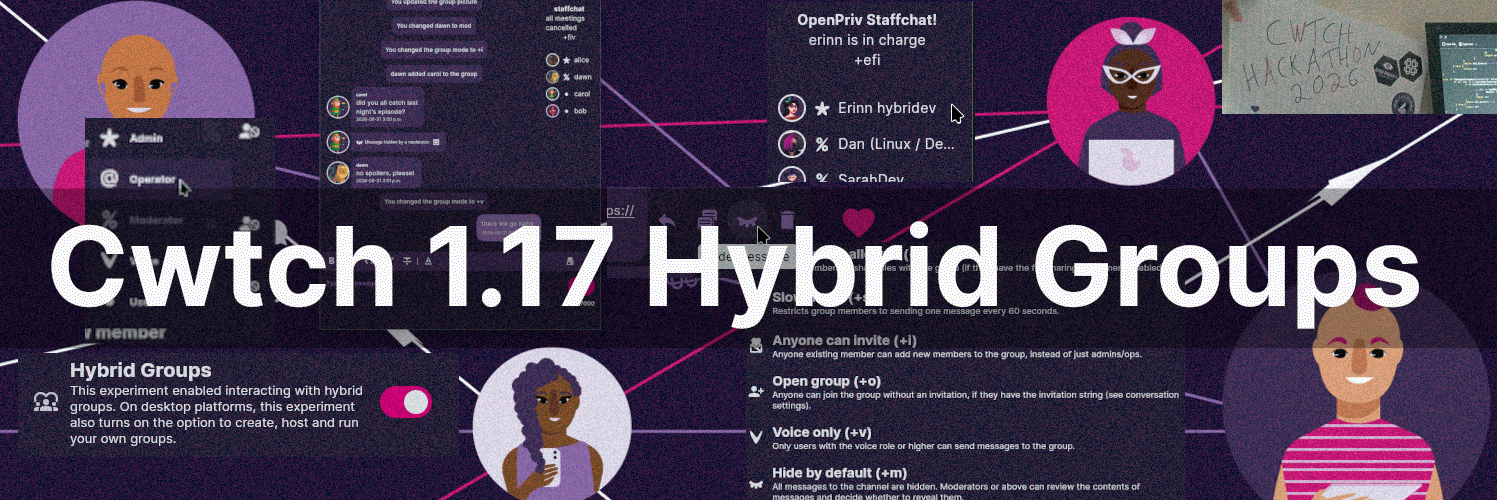
Open Privacy put all hands on deck this summer, and Cwtch 1.17 contains a massive update: an experimental new feature we call Hybrid Groups. Hybrid Groups are a major Cwtch protocol upgrade that allow us to implement long-desired features such as group membership controls and moderation functions.
This post goes into the details of how Hybrid Groups work, and also discuss some of the other great updates in Cwtch 1.17, like P2P connectivity improvements and an important Tor compatibility update. We also discuss how we are managing Cwtch translations going forward, and put out a request for new and existing translators to join us on a new, more human-centric translation platform.
The Problem with Untrusted Infrastructure Cwtch Groups
One of the unique features of Cwtch is that groups are dependent on untrusted infrastructure. This means your group can be hosted on any server, and that server's operator will be unable to glean information about who is using it or for what purpose.
Untrusted infrastructure, however, comes with an efficiency cost. Bandwidth usage scales with the number of groups using the server, rather than the size of the individual group. Counterintuitively, this means there is even some bandwidth usage in the background, when there is no activity within your groups.
Many Cwtch users are on mobile devices, or otherwise slow or metered connections, and so we balanced the desire for untrusted infrastructure by severely limiting the feature set of group conversations. There are no member lists, moderators, or channel settings like many people have come to expect from modern messaging clients.
Hybrid groups are our way of bringing these modern features to Cwtch.
Hybrid Groups
Hybrid Groups allow you to use trusted infrastructure to host your group. You can host a group yourself from within the Cwtch client itself (desktop only), or you can use our upcoming standalone daemon to host them on a server you control. The important distinction from Untrusted Infrastructure Groups is that the person hosting the group will have access to the group messages and metadata. You should only join groups hosted by people you trust. Untrusted Infrastructure Groups are still supported, and both types require separate opt-ins via the Experiment toggles in your Cwtch settings.
Group messages and actions will be routed through the group host using our battle-tested onion-to-onion P2P connections. If some group members are offline when messages are sent, they will be delivered next time they go online and connect to the group host.
Member roles
The first major feature provided by Hybrid Groups is membership control and roles. When joining a group, you'll be able to see who else is in that group:
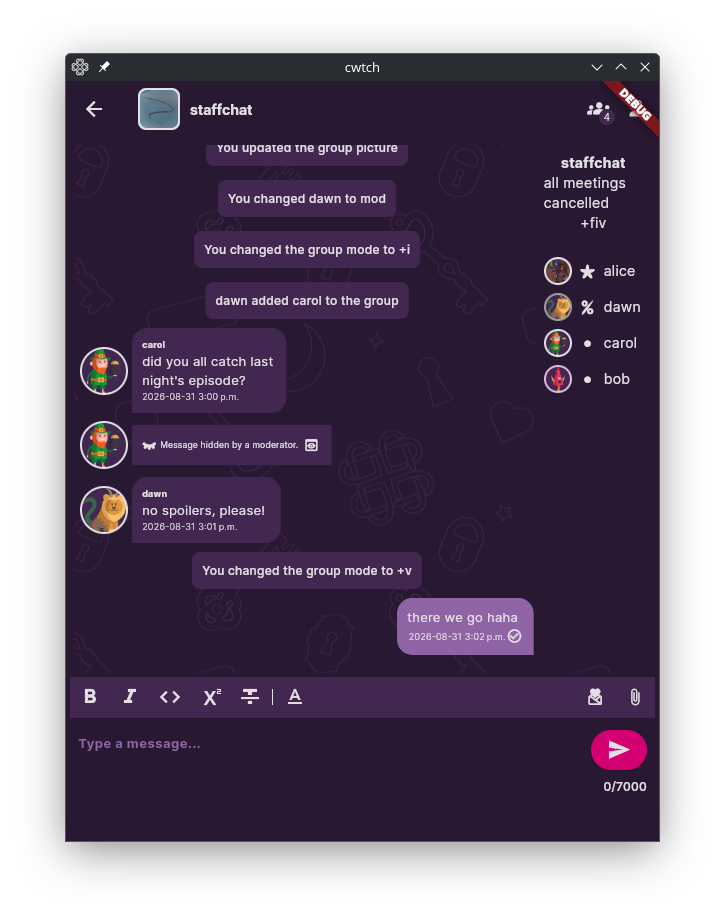
We took some inspiration from IRC when designing our roles, and settled on: admins (*), operators (@), moderators (%), voices (v), and users (•). The permissions these roles have is determined by this chart:
| Underlying Access Control | Admin | Operator | Moderator | Voice | User | Extra Information |
|---|---|---|---|---|---|---|
| Admin Bit | ✅ | Can be transferred | ||||
| Hide/Unhide/Delete Message | ✅ | ✅ | ✅ | |||
| Read | ✅ | ✅ | ✅ | when(-w) | when(-w) | |
| Write | ✅ | ✅ | ✅ | ✅ | when(-v) | |
| Update Group Metadata | ✅ | ✅ | Group Name / Profile Picture | |||
| Promote/demote (see +e) | ✅ | ✅ | ✅ | |||
| Invite | ✅ | ✅ | when(+i or +o) | when(+i or +o) | when(+i or +o) | |
| Change All Channel Modes | ✅ | ✅ | ||||
| Change Masked Channel Modes | ✅ | ✅ | ✅ | |||
| Kick | ✅ | ✅ | ✅ |
Group modes
Hybrid groups also offer eight (for now) toggle-able group modes, allowing channel operators to customize a group to fit its purpose. Here's the list:
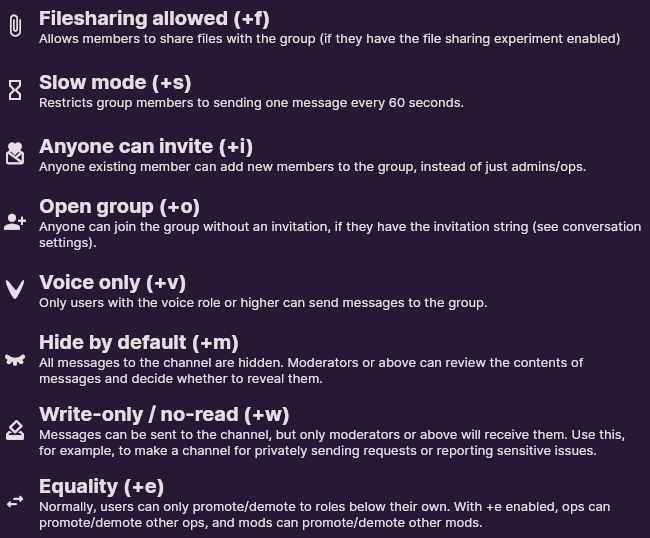
We hope these modes will enable a wide variety of use cases for Hybrid Groups. You could make an "announcements only" group by setting +ov, or you could make a sensitive reporting channel with +w (which makes the group act like a ballot box that only mods can read).
Moderation
Safety is always at the front of our minds when designing features for Cwtch. We are excited to finally be able to offer moderation features in line with that goal, and we hope you'll find our implementation flexible enough to meet a variety of different needs.
- Hiding messages: Moderators can "hide" a message for all users, which is a UI-only effect. Other mods, or tech-savvy users, can still review a hidden message locally. Mods can choose to un-hide ("reveal") a message again later.
- Hide by default mode (+m): All messages to a group in +m mode will arrive pre-hidden. Users will know a message was posted, but won't be able to review it until a moderator reveals it. Moderators get a "preview" function to help decide whether to reveal a message.
- Deleting messages: Alternatively, moderators can delete a message, and the message will also be deleted for every user of the group. This action is not reversible and results in the message being replaced with a placeholder on disk (so other members will be able to tell that a message was deleted).
Access control
Groups can be invitation-only (the default), or they can be open (+o). See below for an example of an open group that anyone can join! You could also set anyone-can-invite (+i) to enable anyone, including regular users, to invite new people to the group.
Moderators can kick people from the group, and this will also ban them if the group is (+o). Moderators can of course later unban users as well. Users are naturally free to leave groups themselves at any time, and can even block a group from re-adding them.
Getting started
After enabling Hybrid Groups under Experiments in your Cwtch settings, you can join our test group by adding the following contact:
grwp-a6cgyetke5fbzehwpgdjqiucvwy6bekrrl3xjt7amireb4ryfzvrtqyd
To host your own group (Cwtch desktop only for now), hit the Groups button on the main Cwtch screen and add a new group with one of your profiles selected as its admin. From there, you can use the Edit Group settings to configure the group to your liking, then use the Membership settings to add people and promote them to various roles.
Like any major new feature, there are bound to be some bugs in Hybrid Groups at first. We'd love if you reported any bugs you encountered to us!
Other improvements in Cwtch 1.17
While working on Hybrid Groups, we fixed a metric tonne of other logic and issues throughout the Cwtch connection engine. You may notice connections starting up faster when you launch Cwtch or add new contacts, disconnecting less often, and generally being more stable.
We've also patched numerous UI issues on both desktop and Android.
Cwtch 1.17 also updates its bundled Tor to version 0.4.9.11. This is important as the older version of Tor will reach end-of-life soon. Installations configured to use a non-bundled Tor daemon will continue to work as usual.
We fixed a crash on devices running Android v10 or older, which was caused by a Go update.
With Cwtch 1.17, we are no longer supporting profiles from Cwtch 1.4 and older. If you have an old profile that was never used with Cwtch 1.5+ (released December 21st, 2021), you will need to first load your profile in Cwtch 1.16 before upgrading to Cwtch 1.17.
Calling all translators!
We absolutely love our amazing volunteer translators who have helped translate Cwtch into 24 different languages!
Unfortunately, the timing of Cwtch 1.17 coincided with the end of open-source support from our old translation platform, which is going AI-first. We value the human touch on our translations as much as our code, and so have decided to move to a self-hosted translation platform. If you've done translations for Cwtch before or want to get started, please reach out and we'll send you an invite to the new system!
Cwtch remains fully translated in 24 languages everywhere except the new Hybrid Groups features, and we hope to cut a follow-up release soon getting us back up to 100% translated.
Download Cwtch 1.17
You can download Cwtch from https://cwtch.im/download.
Subscribe to our RSS feed, Atom feed, or JSON feed to stay up to date, and get the latest on, all aspects of Cwtch development.
Alternatively we also provide a releases-only RSS feed.
A special thanks to the amazing volunteer translators and testers who made this release possible.
Reproducible Bindings
Cwtch 1.17 is based on libCwtch version libCwtch-autobindings-2026-08-31-12-36-v0.3.0.
The repliqate scripts to reproduce our build environment can be found here: https://git.openprivacy.ca/sarah/repliqate-runner
Help us go further!
We couldn't do what we do without all the wonderful community support we get, from one-off donations to recurring support via Patreon.
If you want to see us move faster on some of these goals and are in a position to, please donate. If you happen to be at a company that wants to do more for the community and this aligns, please consider donating or sponsoring a developer.
Donations of $5 or more can opt to receive stickers as a thank-you gift!
For more information about donating to Open Privacy and claiming a thank you gift please visit the Open Privacy Donate page.